Sunday, May 31, 2009

The difference between POP and IMAP

There are two basic ways to set up an email program such as Eudora, Entourage or Outlook to check your email. One is to use a POP (POP3 actually: Post Office Protocol) and the other is to use IMAP (IMAP4 actually: Internet Message Access Protocol). POP is the most common way of doing this but from our point of view IMAP has certain major advantages over POP and that hopefully will become clear to you in a minute. Please don't confuse IMAP with IMP - IMP stands for Internet Messaging Program, and it's the web application used to read your NYUMC/Skirball email from a web browser, better referred to as webmail. There is a certain relation between IMP and IMAP but they're entirely different animals and the similarity of the acronyms is incidental.

If POP is used all your email messages are downloaded from the email server to your computer and stored on the hard drive. Most programs have the option to keep the messages on the server for x number of days but sooner or later the messages are removed from the server. Also, with POP your outgoing emails are kept locally on your hard drive which leads to the familiar and annoying situation where you have different emails on each computer that you use to check email: home, office, work, etc. Furthermore, the local file used by your email program to store messages is specific to the program, there is no widely accepted standard. So, if you ever decide to switch your email program, you will find it necessary to export/import the emails from one program to another which is often painfully slow or doesn't work very well at all. In some cases when moving between different programs and different operating systems (Mac, Windows, Linux) it may be altogether impossible. Most people don't even know where these files are and don't make any backups and don't know how to move them to another computer. POP has basically only two advantages: once the emails are downloaded to your computer, they open very fast since they reside on your local hard drive and your mail storage capacity is only limited by the free space on your hard drive, it's not subject to quotas and size limitations imposed by your mail provider, be it NYU, Earthlink, Verizon, etc. Also, POP is easier to implement and support and it creates less network traffic for your internet provider. For these reasons POP is often the only way your ISP will support.

If IMAP is used all your email messages are stored on the server and never removed. In most cases your email application creates a local cache of messages on your hard drive to speed up the opening of emails, but the originals are not touched. Also, with IMAP (this is the big one!) your sent mail and drafts are uploaded to the server! Because of this, you will see the same incoming and sent messages from any computer as long as your mail program is configured for IMAP. POP3 does not have this functionality. Furthermore, the IMAP folders on saturn are the same ones that IMP (the webmail program) uses. Therefore, if you use IMP to send email while being away from the Institute, then come back to your office, open Entourage you will see that email in your sent mail folder! Or, if you save your message-in-progress in the office it'll get uploaded to your drafts IMAP folder and you will be able to open it at home and continue working on it. Pretty neat, isn't it? Of course like anything good in this world it comes at a price:( First, reading email over IMAP is slower because messages are read "live" off the mail server. It's particularly slow the first time you open a folder or a message as it has to be downloaded and cached. Each next time it's quicker though. But IMAP is inherently slower than POP3, in particular over slower connections. The other negative side of IMAP is that it's sensitive to the size of your mailboxes, at least this is the case with certain mail servers as the one run by us. That is, if you have a lot of messages in your inbox checking your email may become slower and slower over time as your inbox grows large. Also, if your email provider imposes quotas IMAP may become a problem. To address this you need to manage and archive your email. You can create additional IMAP folders and move emails out of your inbox and sent mail. In most cases it's enough to do this once a month. On Saturn we don't impose email quotas though. Your mail storage is limited only by free space in your home directory, but you still need to manage your email to avoid the slowdowns, this is a technical issue.

Since IMAP is an internet standard and the emails are stored on the server it's easy to switch between email programs and operating systems. You can move or setup additional IMAP accounts in Outlook XP under Windows and Mail.app in OSX or Thunderbird uner Linux with equal ease and within minutes you will see all your emails even if you don't have access to your previous program or the other computer. There is no need to copy any files between computers just configure a few settings.

Also, with IMAP we can enable automatic spam filtering for you and the IMAP mail is backed up nightly.
Here is more info on spam filtering on Saturn.

As far as functionality and convenience are considered IMAP is the way to and we encourage you to switch to IMAP. We're working on a page with instructions and we're here to help you with the conversion as well.

Not all email programs have IMAP implemented properly though. All versions of Eudora are notorious for not being able to upload sent mail to the IMAP server properly, therefore we do not support IMAP under Eudora! Our preferred email program is Entourage and we support it 100%. It's a commercial program that comes as part of Microsoft Office for MacOS. We also support IMAP under Mozilla Thunderbird and the latest versions of Apple Mail that comes with OSX 10.4 (Tiger).

If you start using IMAP you should no longer use POP on any other computer! Using a mix of POP and IMAP will lead to conflicts and will basically defy the purpose of switching to IMAP in the first place. To get the the full benefits of IMAP you must switch to IMAP exclusively. For the reasons mentioned above it's OK to continue to use webmail (IMP) as it is essentially an IMAP client.

SUMMARY

POP advantages

- messages load very quickly once they're downloaded
- messages are stored on your hard drive so they're not subject to server storage limits and quotas
- widely supported by ISPs and email providers
- all email programs support it

POP disadvantages

- messages are stored on your hard drive so they're not accessible from other computers
- sent mail and drafts are not accessible from other computers either
- messages are eventually removed from the server
- messages are stored in files that are not compatible between different programs
- it's usually difficult to migrate from one program to another, sometimes impossible
- it's cumbersome to copy your email to another computer (office, home, school, laptop, etc.)
- users normally don't have backups of their email

IMAP advantages

- messages are stored on the server are accessible from any computer and webmail anywhere in the world
- IMAP mail folders remain synchronized with IMP (webmail)
- sent messages and drafts are also stored on the server
- server-side spam filtering is easily implemented with IMAP
- IMAP mail is backed up nightly on the server and can be restored
- ease of migration from a program to a program and from a computer to another computer/location
- ease of setting up additional computers to check your email, no need to copy anything fro one computer to another

IMAP disadvantages

- messages load slower, in particular the first time they're read
- sensitive to size and requires periodic archival of email messages
- subject to storage quotas (not the case with Saturn, however)
- very few ISPs and email providers offer IMAP as it is considered a high end option and it's complex for them to support
- not all email programs support it properly

Saturday, May 16, 2009

Wednesday, April 29, 2009

Demystify Cookies With IECookiesView

If you want to get more information about the cookies used by Internet Explorer on your PC, give IECookiesView a try. This small, simple, free utility shows you details about every IE-related cookie, and gives you a variety of tools for better managing them.

The program lists every cookie, and shows you each cookie's values. You can sort the cookies, delete cookies you don't want, and even find individual cookies by search for a Web site in the program. It will then list all the cookies associated with that site.

If you know a great deal about cookies, you can even edit them. True, few people know what values to change, but if you're one of those, you'll appreciate this program.


Source: Pcworld

Find Duplicate Songs

There are plenty of good programs for finding duplicate files--based on file name, size, and checksums--but finding duplicate songs can be trickier. After all, if you have the same recording in .mp3 and .m4a formats, you've got duplicate songs that are not duplicate files.

So you need to search by metadata--the extra information that defines the contents of a file. Specifically, you need a program that can matches songs with the same title and by the same artist (because Smash Mouth's "I'm a Believer" is not a duplicate of the Monkees' original.)

You'll also have to remember that no list of duplicate songs generated by software will be perfect. A program may not realize that Beatles and The Beatles are the same group. Nor can it always differentiate between the original studio recording and the live concert version. (I've known Dead Heads with probably ten versions of "Brokedown Palace.")

But the right program can give you reasonably accurate lists to work through. Here are three I can recommend:

iTunes: Well, no, I wouldn't recommend you download and install iTunes just for this purpose, but if you're already using it, you've got a pretty good search tool. Just select File • Show Duplicates. If you have the same song as an .mp3 and a .m4a, iTunes will list both, but it won't find any .wma versions.

Duplicate Cleaner: This free duplicate finder from DigitalVolcano has some worthwhile musical features. Once you've pointed it to your music folder, select the Music Search option. Underneath that, I recommend you check Artist and Title and uncheck Album, then click Go. But there's a serious flaw: Duplicate Cleaner doesn't consider songs duplicate if they're in different formats. In my tests, a .wma and an .mp3 of the same song didn't turn up together.

Abee MP3 Duplicate Finder: If you're willing to shell out $20, and all of your music is in .mp3, .wma, and/or .ogg files, this is your best choice (or at least the best one I know of). Abee lets you search for duplicates or "similar files," and with the later option, you get some very smart choices. You can control the degree of Artist and Title similarity (that Beatles vs. The Beatles issue) and set how much of a time difference is allowed. Once it gives you list of likely duplicates, it offers plenty of options for playing, deleting, or moving the files. (Click the image for a closer look).
 
Source : Pcworld

Delete the Contents of a Folder Without Even Opening It

Delete the Contents of a Folder Without Even Opening It

Okay, but what if you want a quick and easy way to clear out a folder while leaving the folder itself intact?

Sure, you can open the folder, tap Ctrl-A to "select all" files, and then hit the Delete key. But for fans of right-click context menus (you know who you are), there's another way. By making a simple change to the Windows Registry, you can add a function called Delete Folder Contents. It's great for those times when you want to empty a folder without trashing the folder itself--and without even opening it first.

One word of caution: Any time you monkey with the Registry, there's a risk of messing up Windows. It's a tiny risk, and I've performed this hack myself with no problems to report, but I just wanted you to be aware.

Here's the process:

1. Click Start, type regedit in the search box, and then hit Enter.

2. In Regedit, go to HKEY_CLASSES_ROOT\Directory\shell

3. Right-click on shell, choose New, Key, and name it Delete Folder Contents.

4. Right-click on the new Delete Folder Contents key, choose New, Key, and name it command.

5. In the right pane, double-click on the Default string value, and then copy/paste this text: cmd /c "cd /d %1 && del /s /q *.*

6. Click OK, exit the Registry, and you're good to go.

Now you can right-click on any folder (without actually opening it first) and you should see the new Delete Folder Contents option.


Source: Pcworld

Sunday, March 22, 2009

5 Websites To Watch High Quality Hollywood Movies Online For Free

One of the best ways to relax from the hectic work schedules and stressful days is to watch movies. And that too if we get chance to watch the movies without going to a movie theatre then it is more comfortable. Especially on the weekdays if you want to see a movie after work, then watching movies online is the best way. So here are the few best web sites that offer high quality/divx quality movie streams online for free.

watch-movies.net

Watch Movie is one of my favourites as it has a huge collection of movie streaming database and excellent community support to pick the right streaming links. You can find free streaming of almost every new Hollywood movie on this web site.

The movie rating system of Watch-Movies.net

This website is very unique compared to other movie streaming site because

  • Multiple Source: The site provides links to multiple movie streaming sources. If one movie stream is not working properly you can switch to the other stream.
  • Movie Rating: The rating of movie provided on the site are very accurate and they give you a hint on whether a movie is good enough to spend your valuable time or not.
  • Movie Stream Rating: Each movie streamed on the site has multiple source and each source is rated based on the availability and quality parameters. So you are well informed to choose a good quality stream once you land on the home page of a movie stream.

The movie steam source rating system of Watch-Movies.net

Joox.net

Joox.net has a good collection of DivX quality movies that appeal to wide range of audience. At Joox you can not only watch your favourite Hollywood movies of different categories(Animation, Cartoon, documentary, etc) but also you can watch Bollywood Movies and TV Shows.

 Visit Joox.net  for free high quality hollywood movie streams

Joox does not host any of the movies streamed on the site. All the movies are hosted on http://stage6.divx.com/, a YouTube like video sharing website for high quality videos.

In order to view movies on Joox, you need to install a plugin from stage6. Joox is definitely a reliable source for watching Hollywood movies online.

66stage.com

66stage.com is another good website to watch latest Hollywood movies. Along with movie 66Stage has an up to date collection of high quality streaming TV Shows, Documentaries, Comedy Shows, Anime, Cartoons.

Like joox.net this website also does not have community support.

Visit 66stage.com for free high quality hollywood movie streams

emol.org

Love to watch classic Hollywood movies? This is the site which you should bookmark. emol has an excellent collection of classic movies and TV shows.

Visit emol.org for free classic english movies

Like the type of movie streams available on emol, the web design is also very classic. The layout and structure of emol website is very classic(like websites of 90s). So you may find little difficult to identify where to identify the movies and play them.

movierumor.com

Movie Rumor is another good source for latest Hollywood movie online streams.This site also hosts links to multiple sources of a same movie so that we can switch the streams if one fails.

Visit movierumors.com for free high quality hollywood movie streams

These are the top 5 of best free high quality movie streaming source we are able to identify on the internet. If any of your favourite movie streaming web site is missing in this list please let us hear through comments.

7 Websites To Listen High Quality Bollywood Hindi Songs Online For Free

As Bollywood films and music are becoming increasing popular world wide, many web sites started offering legally free access to listen to Bollywood Hindi songs. We can find dozens of web sites that offer legally free music streaming but only very few are providing good quality streaming with minimal or very less pop-ups ads.

Here are the few best web sites that offer high quality Bollywood Hindi MP3 songs streaming for free

in.com

in.com web site is from the popular web18 Venture that also owns Indian news channels CNN IBN & IBN Live. The user interface of in.com is the best when compared to the rest of the web sites that offer free music streaming. The quality of songs streaming, esthetic look and feel with web 2.0 standards makes in.com to stand out from other sites. Personally in.com is my favourite web site to listen to the latest Bollywood songs.

in.com is my personal favourite to listen Bollywood Hindi Songs

The downside of the web site is the lack of huge collection of albums. The number of music albums available are considerably small when compared to other web sites. But if you are looking for latest Bollywood Hindi songs then in.com is the best place to hang around.

Raaga.com

Raaga is one of the first web sites that started offering free music online. It's been around for several years and has a huge collection of songs. Almost every Hindi Movie Album, Private Albums, Ghazals are available for streaming.

 raaga_com_free_bollywood_hindi_mp3_songs_streaming

You should install Real Player plug-in (i don't like this software) to listen to the songs. Also the pop-up ads are very notorious, you need a pop-up blocker software to browser through this site.

MusicIndiaOnline.com

MusicIndiaOnline.com has a very good collection of Bollywood Hindi songs for streaming. But the web site does not follow any of the web 2.0 standards. The layout is very plain and advertisements are slapped top, left & bottom of every page.

 MusicIndiaOnline_for_free_bollywood_hindi_songs_streaming

Apart from providing free streaming of Bollywood Hindi songs, the web site also features music reviews, most popular songs lists( current top 10 & 20 songs).

DhinGaNa.com

At Dhingana.com you can not only listen to Bollywood Hindi songs but also you can build a social network with people who loves music. Dhingana platform allow you to discover new music and share it with your friends easily.

dhingana_com_for_free_bollywood_hindi_songs_streaming

To play your favourite movie songs you can explore Alphabetical Album List or Recent Album List or Most Listened Album List. Also there is an option to filter the movie albums based on the time - Today, This Week, This Month and All Time

MusicPlug.in

I love the domain name of this site as it is chosen creatively like del.icio.us. The site has good collection of Bollywood Hindi Songs with zero pop-up ads. Another nice feature is that it offers high quality music playback for high speed Internet connections and medium quality music quality playback for low speed Internet connections.

music_plugin_for_free_bollywood_hindi_songs_streaming_online

Dishant.com

This is another source for good Hindi music online.

Rediff Music

rediff_ishare_hindi_music_streamingRediff, the popular portal for Indian news, movies, reviews, classifieds and shopping, offers free music streaming. But the user interface is so unusable you never think of going to this site until or unless they have the songs that are not available anywhere else on the web.

These are the web sites that I came across and personally used to listen to songs online. Hope you will also find these web sites useful to listen music.

What are your favourite web sites to listen Hindi songs? If we missed any of your favourite sites lets us hear through comments.

8 Websites To Watch High Quality Bollywood/Hindi Movies Online For Free

Hindi movies, also widely known as Bollywood movies, are becoming very popular across the globe. The colorful and musical movies of Bollywood are a good watch to relax and refresh. As long as we are in India we can watch Bollywood movies in the theaters near by. But it is very tough to see the movies if we are away from India. Even though major cities across the globe has theaters to screen Hindi movies, it is very difficult to watch Bollywood movies there.

The best place to watch Hindi movies when we are away from India is to see them online. There are thousands of websites the provide free streaming of movies (lets not get in to the legalities of these sites), but finding good sites is a tough job. So in order to help you to find right websites that offers DVD/HD quality of Bollywood movie streams online for free, here are we are presenting 8 best websites.

1. bharatmovies.com

Bharat Movies offers a huge collection of Bollywood movies online for free. The movies collection include all the new releases as well as old hits. Majority of the movies are provided in good quality and for easily identifying the quality of movies, tags like DVD, DVD HQ are set to them.

watch_bollywood_movies_online_at_bharatmovies

The UI of the website is very simple and clean. You can locate the latest movies in the section "Just Released Hindi Movies" and the recently uploaded movies are available in the section "Newly Added Hindi Movies". Also the movies are grouped based on the actor and actress. So if you want to see any of the Aamir Khan's movie, you can open the page dedicated to the actor and select one among his best movies.

2. apnaview.com

apnaview is another good source for watching Hindi movies online for free of cost. Apart from having a good collection of videos, the user interface of the web is very friendly and there is no doubt that the website is designed by professionals.

You can browse through the Latest Movies section to find new releases or through "Random Movies" section if you are looking for a random movie. Also the user reviews posted for each movie helps us in understanding the quality of the video stream and alternative links if any of the movie links are broken.

watch_bollywood_movies_online_at_apnaview

apnaview offers us variety of ways to keep track of new movies added to the site. You can subscribe to their RSS feeds or newsletters. Even though movies are not arranged by genre/year/artist, the search feature of the site allows you to easily identify the links to watch the movie you are looking for.

3. Watch-Movies-Links.net

Watch-Movies-Links, earlier known as Wath-Movies.net, is a very popular site for online movie streaming. We featured this site in the post 5 websites to watch high quality Hollywood movies. This is one of the best sources I've ever come across to see movies and its my favorite too. Even though this website concentrates more on Hollywood movies, they have a good collection of Bollywood movies under the genre hindi.

When you first open the Hindi movies page of the website you might not find the latest movies in the front page. Use the search box and you will be able to find all the latest Bollywood releases for free streaming.

4. 123onlinemovies.com

This website has a good collection of Bollywood movies that are organized alphabetically. But the movies are not organized by the genre or release dates. So browsing latest movie releases is tough if you don't know the names.

Movie videos are embedded on the site as well as links are available external streaming sources. As each movies has multiple links, the chances of finding working and good quality links are high. It's worth giving a try to this website.

5. interval.in

Interval.in host huge collection of Bollywood movies and the home page of the website has links to view almost all the new releases. Each movie has only one source, if that is broken you have to head towards other sites given in this post.

watch_bollywood_movies_online_at_inerval_in

6. hindimoviesonline.tv

This is the only website that I've come across till now that organizes Bollywood movies based on Genre(like Action/Adventure, Comedy, Drama, Family,  Romance, etc). Like other websites that offer free Hindi movie streaming, this site also has a good collection of movies to pickup for viewing.

watch_bollywood_movies_online_at_hindimoviesonline_tv

7. bhejafry.net

BhejFry offers good quality links to see Hindi movies. Most of the movies hosted on this sites are uploaded to video sharing site DailyMotion and they are organized in a jukebox style to continuously watch the movie if the movie is spitted across files.

8. MovieDesi.com

MovieDesi is another source worth checking for watching Bollywood movies online. This website does not host any videos on its own. They just collects the links of movie streaming sources and organizes them in a friendly manner. For most of the movies you find more than one streaming source link to watch the movie.

watch_bollywood_movies_online_at_moviedesi

Compared to other sites, this site is not up to the date with new movie releases and they have around 400+ movie source links as I write this post.


Friday, March 20, 2009

How to Put DVD and Video on Creative Zen

As a crazy Creative Zen fan, I have used Creative Zen for almost a year and in order to help Creative Zen user to know how to add DVD and video on Creative Zen, I spent few hours to write this guide.
It includes two parts:
Part 1. How to put DVD on your Creative Zen
Part 2. How to put video on your Creative Zen
Preparation:
Actually, Creative Zen can only play 4 kinds of video format (MJPEG, WMV9, MPEG4-SP, and AVI), so you can not put DVD and other video on Creative Zen and play them. If you want to enjoy your DVD on your Creative Zen you have to convert them into Zen supptorted video format.
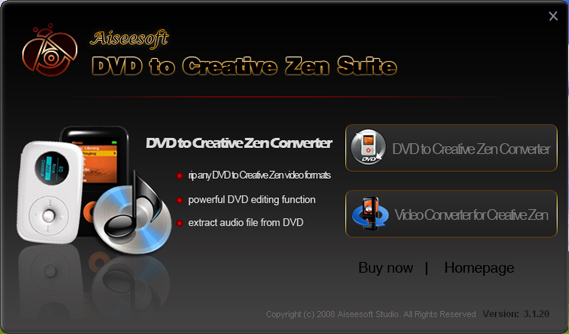
Here I recommend you Aiseesoft http://www.aiseesoft.com/dvd-to-creative-zen-suite.html (DVD to Creative Zen Suite).It contains a http://www.aiseesoft.com/dvd-to-creative-zen-converter.html (DVD to Creative Zen Converter) and a http://www.aiseesoft.com/video-converter-for-creative-zen.html (Video Converter for Creative Zen)
(IMAGE: http://www.aiseesoft.com/images/guide/creative-zen-suite/start.jpg)
Part 1. How to put DVD on your Creative Zen
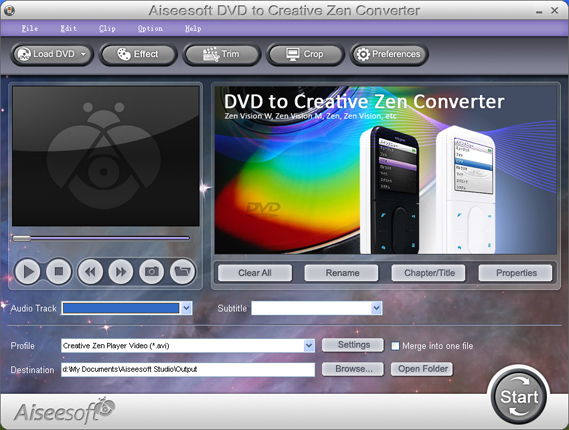
(IMAGE: http://www.aiseesoft.com/images/guide/creative-zen-suite/dvd.jpg)
Step 1. Load DVD
Click "Load DVD" button or "File" to choose load DVD (You can also choose load DVD folder and load IFO fiel)
Step 2. Video settings
Select the output video format you need from the "Profile" drop-down list. Click "Settings" button to set your video and audio parameters.
Step 3. More Functions
You can also do trim, crop and effect DVD, merge your selected chapters into one file, capture your favorite pictures
After doing the above 3 steps you can click "Start" button to start your conversion.
Part 2. How to put video on your Creative Zen
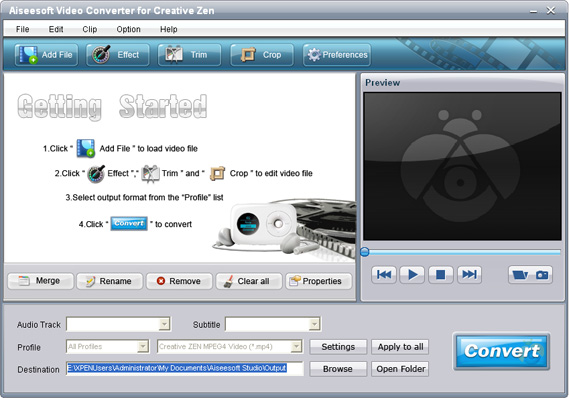
(IMAGE: http://www.aiseesoft.com/images/guide/creative-zen-suite/video.jpg)
Step 1. Add Video
You can add you video that you want to convert by clicking "Add File" or "File" to chosse "Add File"
Step 2. Settings and Output Format
From the "Profile" drop-down list you can find one format that meets your requirement. To have your own video settings you can click "settings" button.
OK, click the "Start" button to begin your conversion.
Tips:
1.      Trim
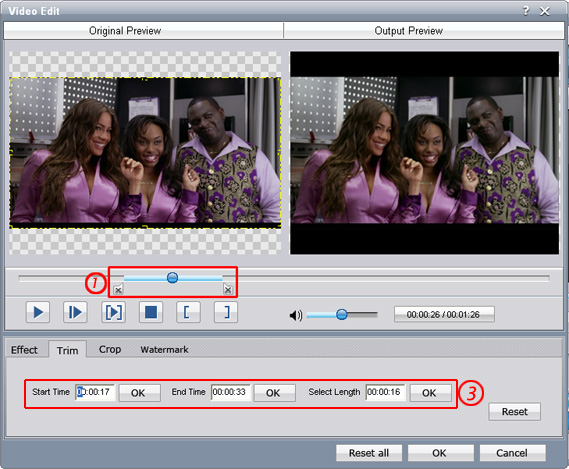
There are 3 ways that you can trim your video.
a.      You can drag the buttons(1) to set the start and end time
b.      You can preview the video first and when you want to start trim click the left one of the pair buttons (2) when you         want to end click the right one.
c.      You can set the exact start and end time on the right side of the pop-up window.
(IMAGE: http://www.aiseesoft.com/images/guide/creative-zen-suite/trim.jpg)
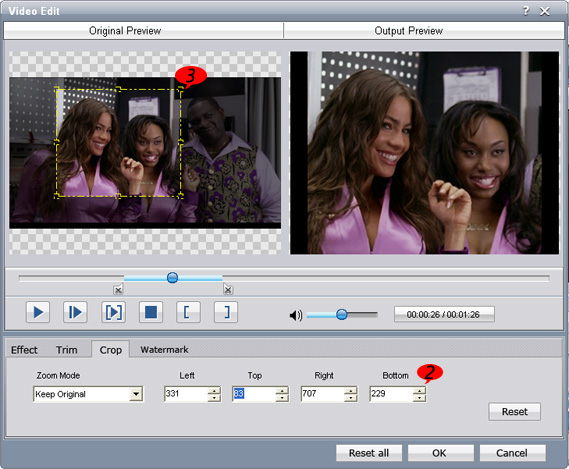
2.  Crop
There are 3 ways that you can crop your video.
a.      We provide 7 modes on our "Crop Mode"(1)
b.      You can set your own mode on the right side of the pop-up window(2)
c.      You can drag frame to set your own crop mode(3)
(IMAGE: http://www.aiseesoft.com/images/guide/creative-zen-suite/crop.jpg)
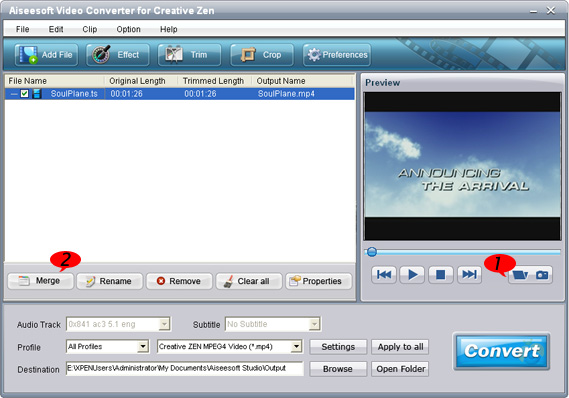
3.       Snapshot and merge into one file
If you like the current image of the video you can use the "Snapshot" option. Just click the "Snapshot" button the image will be saved and you can click the "Open" button next to "Snapshot" button to open your picture. (1)
If you want to make several files output as one you can choose "Merge into one file". (2)
(IMAGE: http://www.aiseesoft.com/images/guide/creative-zen-suite/merge.jpg)

Friday, March 13, 2009

Automate Your Desktop Wallpaper Switching With Latest Flickr Photos


It's probably the most important image on your computer, so do it justice… Here is the very tiny and powerful tool to take your simple desktop wallpaper to the next level!

According to Hitwise, Photo sharing site Flickr is now the 2nd largest photo site behind Photobucket. No surprise then that it's an excellent resource for beautiful wallpapers.

Automatically Switch Desktop Wallpapers 

So, we've gathered you up a free tool that can automate the whole process of fetching and decorating your desktop with latest online photos from Flickr.

Settings can be for just about every time setting you can think of.You can pick where you want to choose photos from using the buttons on the left side buttons of the settings window.The tray icon also lets you to pause switching, view all downloaded photos.

Your background can show one image, four images in a 2×2 grid, or hundreds of thumbnails at once. Images can change after a specified number of minutes, hours or days, or even at a specific time of day. And if you have multiple monitors, it can show different images on each display.


Source : techdream

Know Your PF Transfer /Withdrawal Status Online [Indian Website]

It was a pain for all of us to know the status of PF transfer /withdrawal once it is initiated. We had to wait for a long time and there would not be any clue of whether transfer would happen or not. But now we have got a chance to see PF Transfer/Withdrawl status online. The Indian government has created a web site where we can check the details regarding our PF transfer /withdrawal. All we have to know is our PF account number given in our previous office.

pf-withdrawal-transfer1

Click here to know your PF withdrawal/transfer status.Select the state and the exact place where you were working previously. Provide the establishment code which is available in your PF account number. For example if your PF account number is TN/12345/2003, then your establishment code is 12345. Once you provide this establishment code in the appropriate place, the name of your previous employer appears below the column which confirms that you have entered the establishment code correctly. Finally provide your employee id of your previous company and then click the "Get Claim Status" to know the status of your PF transfer /withdrawal.


Tuesday, March 10, 2009

Train Information on railways

This is really amazing guys! Just try this.

Add cleartrip.trains@gmail.com to your Gtalk friend list.

Check the Availability in the trains along with the fare .

Hi! I am cleartrip's trains search bot. Say 'help' for a brief help message. Say 'commands' for list of commands. if you find it useful or have any suggestions say 'feedback your message'. Invite your friends by saying 'invite gmail_ids'
Hi there! I am cleartrip's train search bot. I can search trains for you.
Tell me your journey details like this: 'Mumbai New Delhi Mar 11 3A'
ME : Chandigarh Jaipur March 28 3A
cleartrip.trains: Searching for trains between Chandigarh and Jaipur on 28 Mar class 3A

5632 – Ghy bme bkn exp Rs. 605, @ 14:35 [ ]

2307 – Hwh==ju==exp Rs. 635, @ 15:30 [Waitlist 6]

4218 – Unchahar exp Rs. 782, @ 16:25 [Available 45]

To check availability say 'avail' followed by train number To book say 'book' followed by train number and passenger details. Ex. 'book 2925 adult 1 child 1 senior female 1'

Hope it makes the work easier.

6 Best Alternatives of Windows Media Player


 VLC Media Player :

VLC player


VLC (initially VideoLAN Client) is a highly portable multimedia player for various audio and video formats, including MPEG-1, MPEG-2, MPEG-4, DivX, MP3, and OGG, as well as for DVDs, VCDs, and various streaming protocols. It also can be used as a server for unicast or multicast streams in IPv4 or IPv6 on a high-bandwidth network. The most prominent additions to version 0.8.6 are probably Windows Media Video 9 and Flash Video. Other important changes are improved H.264 decoding, better Windows Unicode support, and a full-screen.

2. KMPlayer :

KM Player

The KMPlayer is all-in-one media player covering various formats such as VCD, DVD, AVI, MKV, Ogg, OGM, 3GP, MPEG-1/2/4, WMV, RealMedia, QuickTime etc. It has an extra feature to play Incomplete/Damaged AVI file, Locked Media Files while downloading or sharing, Compressed Audio Album (zip, rar) and so on. It handles a wide range of subtitles and allows you to capture audio, video, and screenshots in many ways. The player provides both internal and external filters with a fully controlled environment without grappling with DirectShow merit system. The player can set multifarious audio and video effects, control playback speed and octave, select parts of a video as favorites, do a powerful A-B repeat, remap the keys of remote interface for HTPC including overlay screen controls, change a skin dynamically depending on a media type playing, and many more. It is completely customizable thanks to a wide selection of skins and color schemes, and configuration options are extensive.

3. Media Player Classic :

Media Player Clasic

Media Player Classic is the perfect substitute for Windows Media Player. Aestetically is identical to version 6.4 and has the same lightness in terms of RAM occupation, but it has much more usefull functions. Features: with 'right' and 'left' keys it's possible to go forward/backward of one single frame; with 'Ctrl + right'/'left' it's possible to skip one predefinite quantity of frames; with 'Ctrl + up' it's possible to change faster the speed of reproduction; it's possible to visualize with media player Quicktime and RealMedia movies (but that programs must be installed); in full screen modality it's possible to show a scroll bar putting the mouse in the lower portion of the screen; in full screen it's possible to do the redimension images and adopt a cinema format or a TV format; it work as a DVD player too; keys are completely customizable; it can show subtitles.

4. GOM Player :

GOM player

GOM Player (Gretech Online Movie Player) is a freeware media player for Microsoft Windows. It is the primary client player for South Korean GOM-TV and is more popular in South Korea than any other media player. Key strengths are the ability to play the majority of media files without the need to obtain a codec, and the ability to play some broken media files, both advantages over traditional players, like Windows Media Player. GOM player can also play .flv files.

5. ZoomPlayer :

Zoom Player

Zoom Player can be compared to a game of chess, it can be learned by a 4-year old in minutes, but it may take a lifetime to explore its feature rich yet unbloated capabilities.
Zoom Player supports every format imaginable (AVI, DIVX, XVID, MPEG, Flac Audio, Monkey Audio, Matroska, Windows Media, OGM, RealMedia, QuickTime, Flash and more), updated on a regular basis (new stable beta releases every few weeks), every feature is fully documented, supports all the latest playback technologies (Multi Monitor, VMR9, P2P Video Preview) and sports one of the most active support forums you can imagine. Designed for use as an every day media player and all the way up to a Home Theater PC control center. Special TV Viewing features allowing easy remote control of your media playing experience. From Newbie to Guru, Zoom Player is for you.

6. BSPlayer :

BSPlayer

BS.player is a Windows based multimedia player that plays all types of media files (AVI / MPG / ASF / WMV / WAV / AVCHD / FLV YouTube videos / MP3) and specializes in video and DivX playback. Main features: display subtitles, support custom subtitles position, color, font, transparency, supported formats: MicroDVD, subviewer, SubRip; fully skinnable - any shape, transparent skins; resizable movie window; multilingual, drag & drop support; command line support; pan-scan and custom pan-scan option; custom aspect ratios; playlist support; resolution changing; frame capture; AVI files with more than 2 audio streams supported (multilanguage); support for OGM files, including more then 2 audio/video tracks, supports embeded subtitles/chapters; external audio file supported; S/PDIF output supported for AC3 files.